If you’ve ever queued for a ranked Dota 2 match only to spawn in with 200+ ping, miss three last hits in a row, and fumble a crucial Black Hole cast because of input lag, you know how frustrating bad server connection is. A lot of players write this off as bad luck, but it’s usually a quick fix. Learning how to change region in Dota 2 is one of the simplest ways to take control of your match experience, no complicated software or account changes required. You don’t have to stick to the default region the game assigns you if it’s not giving you the performance you want.
How to Change Region in Dota 2: Full Step-by-Step Walkthrough
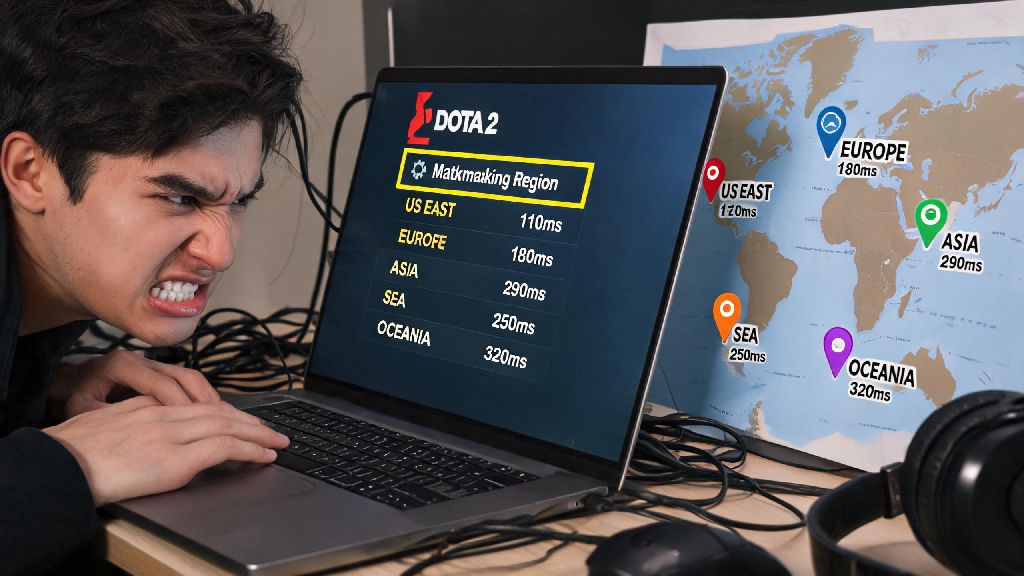
The process only takes a minute, and you can adjust it as often as you want between matches. First, launch Dota 2 and click the small gear icon in the top left corner of the main menu to open your settings. Navigate to the “Play” tab, then scroll down until you see the “Matchmaking Region” section. You’ll see a full list of all available Dota 2 servers, with a real-time ping indicator next to each one. Always check the ping indicator next to each region before selecting—the number shown is the average time it takes for your input to reach the server, so lower is always better. You can select up to 3 regions at once if you want to cut down on queue times, but we recommend sticking to 1 or 2 with ping under 100ms for competitive play. Once you’ve selected your preferred regions, just exit the settings menu and queue for a match as normal. The game will automatically prioritize matches on the servers you picked.
Key Factors to Consider Before Picking a New Region
Changing regions isn’t just about picking the one with the lowest ping, though that’s the biggest priority for most players. There are a few other details to keep in mind to make sure you get the best possible experience. Anything under 80ms is ideal for competitive play, and you’ll barely notice any lag at that level. If the only low-ping region has a tiny player base, you might end up waiting 20+ minutes for a ranked match during off-peak hours, so balance ping with expected queue time. You also want to think about communication: if you pick a region where most players speak a language you don’t understand, coordinating team fights and ganks will be much harder, even if your ping is perfect. A lot of new players make avoidable mistakes when switching regions that end up ruining their matches anyway. Here are the most common ones to watch out for:
You don't have to overthink your region choice, but spending 30 seconds checking these details before you queue will save you a lot of frustration later. If you’re switching regions to play with friends who live abroad, run a quick 10-minute turbo match together first to make sure everyone’s ping is stable enough for ranked play.
Common Issues When Changing Dota 2 Regions and Fixes
Most of the time, switching regions works perfectly on the first try, but there are a few common glitches players run into. One of the most frequent is a region being greyed out and unselectable. This usually happens when the server is down for maintenance, or your internet connection is having trouble reaching that region. If you’re using a VPN to access a restricted region, make sure you connect to the VPN server before opening Dota 2—the game caches your location data on launch, so it won’t detect the VPN if you turn it on mid-session. Another common issue is the ping you see on the region select screen being way lower than the ping you get in-game. This is usually because background apps are using up your bandwidth: close any streaming services, active downloads, or other online games before you launch Dota 2 to free up connection speed. If you’re on wifi, switching to a wired ethernet connection will almost always cut your ping by 20-30ms and make it more stable. You can't change regions mid-match, so always double check your selected regions before you hit the queue button. There’s no way to switch servers once the game has started, so if you end up on a laggy server you didn’t mean to select, you’re stuck there for the full match.
Is Changing Dota 2 Region Allowed, and Will It Affect Your Account?
A lot of new players worry that switching regions will get them banned, or that they’ll lose their MMR or items when they move. The good news is Valve officially allows players to change regions as often as they want, with no penalties, as long as you’re not using region switching to exploit the ranked system (like smurfing in lower-MMR regions to farm easy wins). You won't lose any MMR, items, or account progress when you switch regions—all your account data is tied to your Steam account, not the server you play on. The only small downsides you might run into are longer queue times if you switch to a region with very few players at your MMR, or more communication issues if you don’t speak the local language. Some regions also have slightly different report cultures, so you might get more reports for things that are considered normal in your home region, but that’s rare as long as you’re not being toxic to teammates. If you’re traveling abroad, switching to the closest local region is the best way to keep playing ranked without dealing with unplayable ping back to your home server.
At the end of the day, Dota 2 is meant to be fun, and lag or hour-long queue times can ruin that faster than a pos 5 that refuses to buy wards. Knowing how to change region in Dota 2 lets you take control of your match experience, whether you’re chasing lower ping for ranked play, cutting down on queue times during slow hours, or playing with friends who live on the other side of the world. Just remember to test any new region with a casual match first, so you don’t risk losing MMR to unexpected lag or communication issues. It’s a tiny change that can make a huge difference in how much you enjoy every match.